Your agents on iPhone and Apple Watch
When your iPhone is on the same network as the Agent HUD release on your Mac, iPhone and Apple Watch show that Mac's quotas, balances, token statistics and sessions, free to use. Agent HUD Remote takes the same view to any network and adds conversations and decisions.
Updated 2026-10-26
What works without a subscription?
The phone reads the Mac directly over your network. With one Mac or several, this view is free to use. Agent HUD Remote adds the rest: other networks, conversations, messages, decisions, notes from your wrist, alerts and Live Activities.
| iPhone | Apple Watch | |
|---|---|---|
| Quotas, balances and token statistics | ✓ | ✓ |
| Sessions and their tokens | ✓ | ✓ |
| Widgets on the Home Screen, Lock Screen and StandBy | ✓ | — |
| Several Macs | ✓ | ✓ |
| Any network, conversations, messages, decisions, notes that become sessions, alerts and Live Activities | Agent HUD Remote | Agent HUD Remote |
On iPhone
Home has a card for each account: every quota window with the share used and its reset time, a DeepSeek balance, and the resets Codex has available. The same card turns to each window's burn rate and to tokens per hour.
Sessions lists today's tokens by kind with their estimated cost, then your sessions. A session shows its tokens turn by turn and how full its context window is.
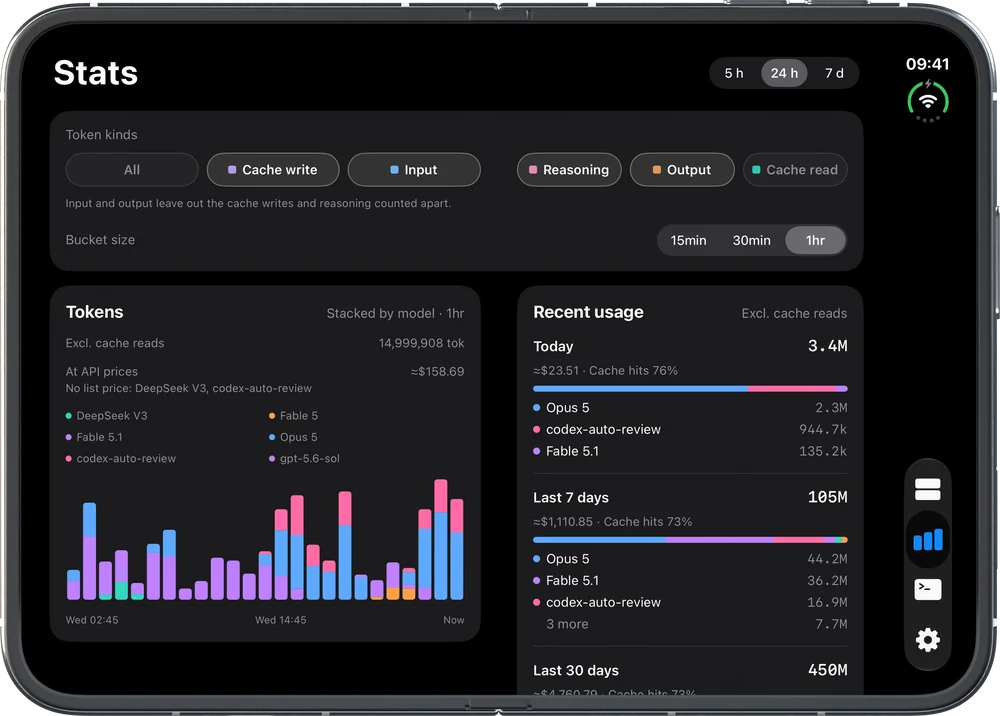
Stats charts tokens by model over the last 5 hours, 24 hours or 7 days. The same page lists today, the last 7 days and the last 30 days with their tokens, cost and cache hits, and the hours your agents worked. On an unfolded iPhone Duo, the pages split into two columns at the fold.
Widgets put one agent's quota, balance and cost or its tokens, or the last 24 hours of tokens from all your agents and Macs, on the Home Screen, the Lock Screen and in StandBy.
On Apple Watch
The watch lists your agents. Each one has its quota rings with the share used and the time to reset, its tokens, and its recent sessions. The watch takes this from the paired iPhone, so it shows what the phone has read from your Macs.
With Agent HUD Remote, the watch also shows a session's latest reply and reads it aloud, answers requests, takes spoken replies, and turns a spoken note into a new session on your Mac.
More than one Mac
Each Mac reads the agents on that Mac. Token history and sessions come from the records each Mac keeps, so a session appears under the Mac that ran it. The phone shows your Macs together, or one at a time.
Quota belongs to the account. Two Macs signed in to the same account read the same windows from the vendor, and the phone shows that account once, with the newest reading. Nothing is counted twice.
Cursor's usage comes from your Cursor account, so it includes work done on other computers. The Macs never read each other's data. They meet only on the phone.
What stays private?
On the same network, the phone reads the Mac over HTTPS, with the Mac's certificate pinned when the phone pairs. Sharing on the network is off until you turn it on in the Mac app. A paired phone can read; it cannot send messages or answer requests.
Your agents' credentials are never sent to the phone, and this path does not pass through Agent HUD's servers.
Away from your network
Agent HUD Remote keeps iPhone and Apple Watch connected to the release through your own iCloud, on any network. It adds conversations, messages to Claude Code and Codex, decisions, notes from your wrist that become new sessions, alerts and Live Activities.
iPhone and Apple Watch work with the release, the Agent HUD you download for your Mac.
Questions
Do I need a subscription to see my Mac on iPhone?
No. On the same network as the release, iPhone and Apple Watch show quotas, balances, token statistics and sessions, and iPhone has its widgets, from one Mac or several. Agent HUD Remote adds any network, conversations, decisions, alerts and Live Activities.
Does Apple Watch need the iPhone?
For quotas, statistics and sessions, yes: the watch shows what its paired iPhone has read from your Macs. With Agent HUD Remote, it also answers requests through iCloud on its own.
Will two Macs on one account count my quota twice?
No. Quota is read from the vendor for the account, so both Macs read the same windows and the phone shows the account once.
Why does one Mac's token history not appear on the other?
Token history comes from the records each Mac keeps of the work it ran. The Macs do not exchange data; the phone shows them side by side.
Do I need an Agent HUD account?
No. The phone pairs with the Mac on your network, and Agent HUD Remote uses your own iCloud.