Agent HUD Community Rewards
Share your workflow.
Get Remote rewards.
One original video or illustrated post. Reach 1,000 views or reads for a year of Agent HUD Remote, or 10,000 for lifetime access.
- 1,000 → 1 year
- 10,000 → lifetime × 3
- No automatic renewal
Redemption opening soon Applications are reviewed manually. Approved applicants will receive redemption details by email when the offer opens.
One qualifying post is enough.
1,000
Views or reads on one post
One year of Remote
1 Mac · No automatic renewal
10,000
Views or reads on one post
Lifetime Remote
3 Macs · Upgrade your year reward
Contributor
An accepted contribution merged
Lifetime Remote
3 Macs · Code, docs, tests or translations
A real workflow. Three simple steps.
01
Use Agent HUD
Start with the free Mac app. Try the island, Dynamic Dock, quotas, or turn reminders in your own work.
02
Share your experience
Publish an original video or illustrated post showing Agent HUD in use. Include the official website and disclose the gift offer.
03
Submit the link
Once one post reaches 1,000 or 10,000, submit its public link and your email for review. Accepted contributors can submit their merged PR instead.
What to share, and how to record it
Pick a real moment
Show a permission approval on the island, a quota warning, a completed turn, or the agents in your Dynamic Dock. Explain what it helps you do.
Record or take screenshots
Press ⌘⇧5 on Mac to record the relevant screen area, then show the actual operation and result. For an illustrated post, use your own screenshots and explain the steps.
Publish with context
Include agenthud.app and say you are participating in this gift offer. Your honest opinion is welcome; no minimum video length or word count is required.
How a share qualifies
- Show Agent HUD running in a real workflow, with your own recording or screenshots. Reposting promotional material does not qualify.
- Make the post public and include agenthud.app so people can find the app.
- One original post on one platform must reach 1,000 views or reads for a year, or 10,000 for lifetime access. Use the platform’s displayed count; counts across posts or platforms are not added together.
- Only genuine views or reads count. Purchased or artificially inflated traffic does not qualify.
- Keep the rewarded post publicly available for at least 30 days after receiving the reward.
- Honest opinions and criticism are welcome. Disclose that you are participating in an offer for gifted Agent HUD Remote access.
- One reward per person. If the same post later reaches 10,000, apply to upgrade the year reward to lifetime access; the rewards do not stack.
Request a reward license
Submit your email and a public post or merged PR link for review.
Request a reward license ↗Approved applicants will receive an email. Submitting does not automatically issue a license.
Questions about the offer? Email support@agenthud.app
Your details are used to review your application and arrange your gift. How your information is used
Before you share
What does each reward include?
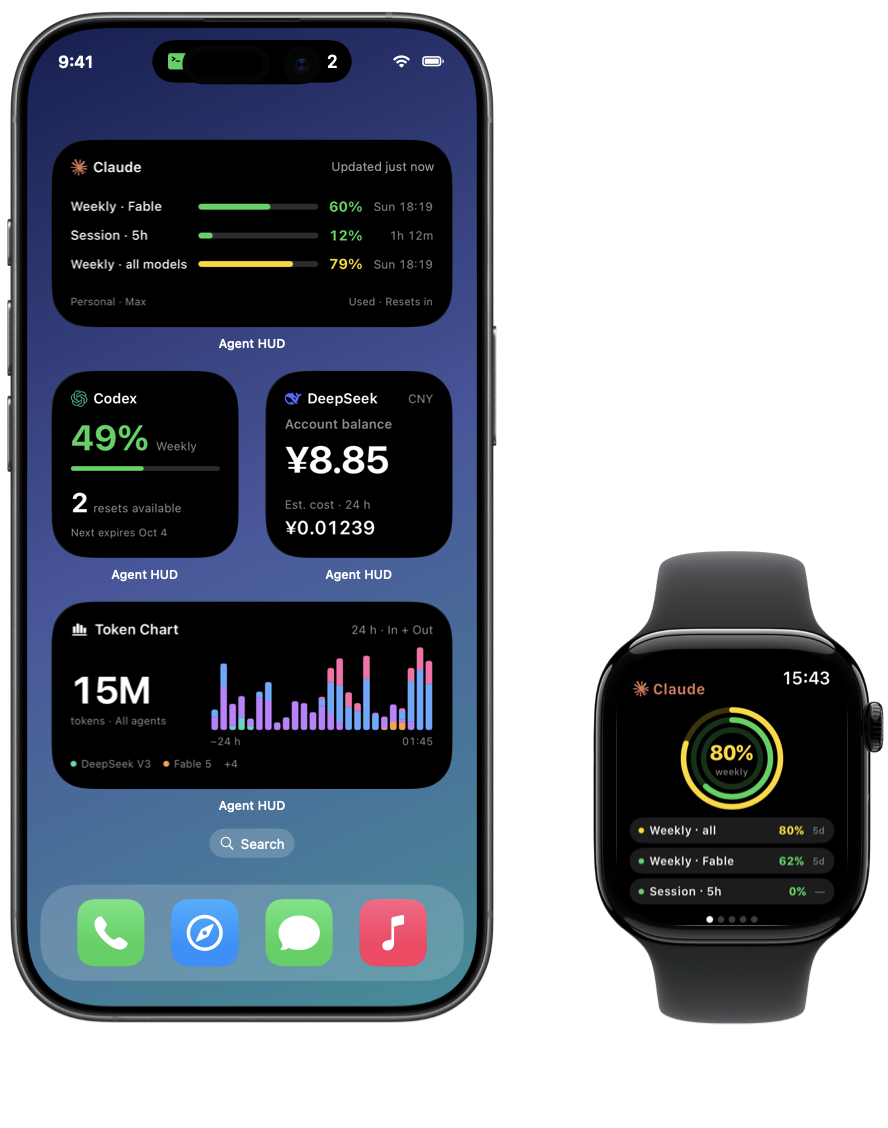
The year reward covers 1 Mac for one year. The lifetime reward covers 3 Macs without a fixed expiry. Both provide Agent HUD Remote viewing on iPhone, widgets and Apple Watch; the iPhone and Watch apps are free to download.
How are views or reads counted?
Counts are verified using the publishing platform’s displayed total for one post. Submit the public link; additional details may be requested by email if the count is not visible. Counts on different platforms are assessed separately.
Can the same post qualify for an upgrade?
Yes. Apply for a year at 1,000, and apply again with the same email and post link at 10,000. After review, the earlier year reward can be upgraded to lifetime access.
When does the year start?
When you complete the free checkout with your personal code. There is no automatic renewal or charge. At expiry, local monitoring on your Mac remains free.
How do contributors qualify?
A maintainer must accept and merge an effective code, documentation, test or translation contribution. Submit the merged PR link for a lifetime reward. Stars, forks and simply opening an issue do not qualify; contributors do not need to publish a promotional post.
Is a purchase required?
You can show the free Mac features without purchasing Remote. To share a Remote workflow, you need an existing Remote entitlement. For a creator trial, use the contact email below.
Which publishing platforms qualify?
RedNote, Bilibili, Douyin, WeChat Channels, X, Reddit, YouTube, TikTok, Instagram, or another platform with a publicly accessible post and verifiable count. Follow the platform’s own posting rules.
Is a long video or a positive review required?
There is no follower, video-length or word-count requirement. One original post that shows real use and reaches the relevant threshold is enough after review. Your opinion is your own.
How does a reward affect an existing Remote subscription?
A gifted license does not automatically cancel, refund, or extend an existing subscription. Arrangements are confirmed by email before redemption.
Ready to use Remote today?
Get the free iPhone app and subscribe to Agent HUD Remote there to see your Mac on your other devices.