Quotas and balances
How Agent HUD reads each vendor's quota windows and balances, forecasts the burn rate, and alerts you before a window runs out.
Agent HUD keeps every quota your agents' vendors report at the edge of your screen: how much of each window is used, when it resets, how fast it is going this cycle, and whether that pace runs it out first. Balances, such as DeepSeek's, show as money with the spend per day.
What a window is
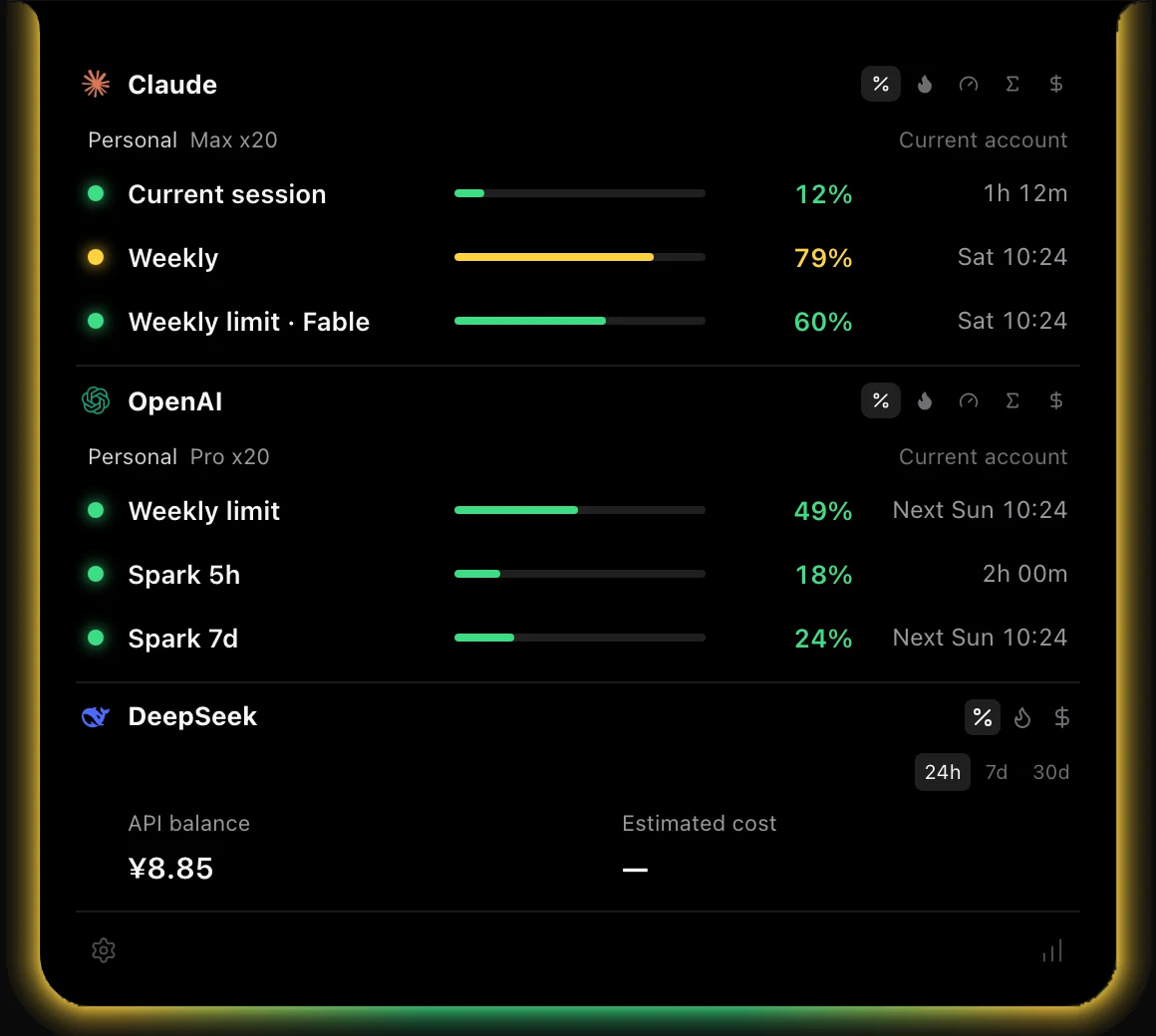
A window is one allowance the vendor meters over a period, with its own name, length and reset time: a five-hour session window, a weekly limit, a monthly total. Each row in the panel is one window exactly as the vendor reports it. Agent HUD does not assume what your plan includes.
- Windows are never added together. A weekly Claude limit and a five-hour Codex limit run on different clocks, and any one of them can be the one that stops you.
- Quota belongs to the account. Two programs on one sign-in, such as the Codex app and the Codex CLI, show one set of windows. Two Macs signed in to the same account read the same windows from the vendor.
- Tokens are never turned into quota, and a missing quota is never worked out from token counts.
Each vendor's windows
In the panel, quota blocks are named by vendor: Claude Code's windows are under Claude, Codex's under OpenAI. Where space is tight, a row may show a shorter name, such as Weekly.
| Agent | Windows, as the app names them |
|---|---|
| Claude Code | Current session (five hours), Weekly limit · All models, and a weekly limit for each model family your plan limits, such as Weekly limit · Opus |
| Codex | Named by length, such as 5h limit and Weekly limit. Any other limit Codex reports shows under its own name. The earned resets your account has available are counted beside them |
| Cursor | Included usage, Cursor Models, Other Models, Individual spending limit, Pooled usage and On-demand usage, as far as your plan reports them, with the reset Cursor gives |
| GitHub Copilot CLI | Premium requests, AI credits, Chat messages and Code completions: the ones metered on your plan, each with its reset date |
| Antigravity | One row per model group and window, such as Gemini Models or Claude and GPT models |
| Grok Bot | Weekly usage limit, or Trial usage limit during a trial, and Extra usage when a limit is set for it |
| Kimi | 5-hour quota, Weekly quota and Monthly total quota, as your Kimi Code plan reports them |
| OpenCode | The OpenCode Go plan's 5-hour limit, Weekly limit and Monthly limit |
| GLM Coding Plan | 5-hour credits and Weekly credits, or 5-hour limit and Weekly limit on older plans, and MCP usage when GLM reports it |
| Devin CLI | Daily limit and Weekly limit |
| DeepSeek Harness | A balance, not a window |
| Pi | The plans it runs on: a ChatGPT sign-in under Codex, a GLM key under GLM |
| WorkBuddy | A model's plan limit, only after WorkBuddy records reaching it, until the reset it gave |
The agents with no quota column in Supported agents report none; Agent HUD shows their tokens and sessions only.
Reading a row
Each row shows the share of the window used and the time it resets.
- Used or left: by default the percentage is the share used. To show the share left instead, open Settings → General → Usage display and set Quota percentage to Remaining (100% → 0%). An 82% used window then reads 18%. Colours, burn rate and alerts always work from the share used.
--: no reading has arrived for this window yet, or the vendor does not report it for your account. It never means zero.- Pending update: the reset time has passed, but no new reading has confirmed the reset. The row keeps its last reading until one does.
- Stale: the last read failed, so the row keeps the last reading and marks it out of date: "Last quota reading is stale; refresh this account."
A reset counts once a new reading moves the reset time forward, or shows the window back at zero after it had been at least 5 points higher.
To hide a window or change the order of rows, see Glow and panel.
Burn rate and forecast
The burn rate is the share of a window used per hour, measured from the readings of its current cycle. Switch a block's rows to it with the flame button beside the block. Each row then shows:
- the rate, such as 10.0%/h;
- the day and time the window runs out, when that pace empties it before the reset;
- otherwise the share you will have used by the reset, such as 62% by reset.
A forecast needs readings that span at least 15 minutes of the current cycle, or one hour for a window of a day or longer, such as a weekly limit. Until then the row says Sampling, and after each reset, Resampling.
For example: with 40% left and a burn rate of 10% an hour, the window lasts about four hours if the pace holds. If it resets in three hours, it lasts; if it resets in six, it runs out first.
The burn rate measures quota, not tokens per hour or cost.
Colours and alerts
The glow and each row take their colour from the share used. The levels are fixed, so a reading has the same colour on the Mac, iPhone and Apple Watch:
| Share used | Colour |
|---|---|
| Under 70% | Green |
| 70% and above | Yellow |
| 90% and above | Red |
A window counts as used up when 0.5% or less is left.
Alerts appear on the HUD itself, never as macOS notifications. Agent HUD alerts you:
- Once when a window is at risk: the forecast says it runs out before its reset, or it crosses 90%. The alert reads "At the recent burn rate, this window may run out before it resets." or "Usage has reached the critical threshold."
- When a window is used up: "This window is empty. Waiting for reset."
- When a new reading confirms a reset: "This quota window has reset." If the same account has other windows still used up, the alert names them.
- When Codex adds an earned reset to your account: "A usage reset was added to this account."
The first reading after Agent HUD starts only sets a baseline, and a reading more than 30 minutes old raises nothing, so restarting the app never repeats an alert. With Agent HUD Remote, the alerts for crossing 90%, a used-up window, a confirmed reset and a new earned reset also reach iPhone and Apple Watch; a forecast-only warning stays on the HUD.
Balances
An agent billed from a balance shows money, not a percentage.
- DeepSeek Harness: the DeepSeek API balance, in its own currency, with the spend per day and the day it runs out at that pace. The spend is an estimate at DeepSeek's list price from the calls Harness recorded on this Mac. The balance turns yellow at 10 CNY or 2 USD and below, and red at zero or when DeepSeek refuses calls.
- Relays: when your agents go through a relay, you can switch it on in Settings → Relays to read what it has left. Nothing is sent to a relay until you switch it on.
Each currency stays as it is; amounts are never converted.
More than one account
Each account shows under its vendor with its own label and windows. The same account seen twice, such as one email reported by two Antigravity CLIs, counts once.
- Claude Code and most other agents: the account the agent is signed in to on this Mac.
- Codex: the same email in two workspaces stays two accounts. A ChatGPT sign-in in Pi that matches a Codex account counts once.
- GLM Coding Plan: each key is its own plan, even when two keys belong to one account.
Add Codex accounts
Sign in to each extra account with Codex, each under its own CODEX_HOME folder.
Open Settings → Agents → Codex and find Additional Codex accounts.
Add each folder, one per line, as an absolute path or starting with ~/, then select Save accounts.
Your default account stays included. The extra accounts add their limits, not their sessions, and Agent HUD reads them one at a time. A failed folder shows a notice while the others keep reading. Clear the list to return to the default account only.
Add Antigravity CLI accounts
Open Settings → Agents → Antigravity and find Antigravity CLI accounts.
Add the path of each CLI's settings.json, one per line, or select Add default configuration.
Select Connect accounts, then start or restart each CLI.
Connecting adds a local quota callback beside the CLI's status line and keeps your status line as it was. Accounts appear as you use them, including after you switch accounts in the CLI. A reading older than five minutes is marked stale until the CLI reports again. To restore a CLI's original status line, remove its path and select Connect accounts again.
Signed out, or a read that fails
An agent that is missing, signed out or failing never hides the others.
- Signed out: the agent's quota rows go away, and its block says why and how to sign back in, for example "Claude Code is signed out. Run claude to sign in again and the quota returns" or "Codex is not signed in. Run codex login with ChatGPT to read its quota".
- No plan limits: an API key, a third-party platform or a custom model provider has no plan to read, and the block says so, for example "No plan limits for this login (API key or third-party platform)".
- A failed read: the last reading stays, marked stale, and Agent HUD tries again.
In every case the agent's tokens and sessions keep counting from the records on your Mac. Accounts are read one at a time, and no read sends a message to a model.
Last updated