Apple Watch
Quotas, tokens and recent sessions on your wrist, free from the paired iPhone. With Agent HUD Remote, replies, answers and spoken prompts too.
Agent HUD for Apple Watch comes with the iPhone app. It lists your agents with their quota rings, tokens and recent sessions, taken from the paired iPhone, free to use. With Agent HUD Remote, the watch also shows a session's latest reply and reads it aloud, answers requests, takes spoken replies, and turns a prompt you say into a new session on your Mac.
The watch app needs watchOS 10 or later and the Agent HUD app on the paired iPhone.
Free and with Remote
| On the watch | Free | With Remote |
|---|---|---|
| Agents with their quota rings, resets and balances | ✓ | ✓ |
| Tokens over 24 hours, 7 days and 30 days | ✓ | ✓ |
| Recent sessions and their statistics | ✓ | ✓ |
| A session's latest reply, read aloud | ✓ | |
| Answers to tool calls, questions and plans | ✓ | |
| Spoken replies to Claude Code and Codex | ✓ | |
| Spoken prompts that start new sessions | ✓ | |
| Alerts and running sessions in the Smart Stack | ✓ |
Your agents at a glance
The first screen lists your agents. Each row shows a ring marker and one number: the share used of the window closest to its limit, with a short countdown to its reset. An agent with only a balance shows the balance and how long it lasts; one with neither shows its tokens over the last 24 hours. The end of a row counts the sessions waiting for approval, or else those running.
Tap an agent, then turn the Digital Crown to page through:
- Rings: every quota window of the account. Scroll down for Usage details: each window's share used and countdown, Codex's resets and their expiry, balances with their estimated cost over 24 hours and 7 days.
- Tokens: this agent's tokens over 24 hours, 7 days or 30 days, by model. Tap a model to show only it.
- Recent sessions: sessions active in the last 24 hours or still running. Tap one for its page.
The watch shows what the iPhone last read from your Macs, so it follows the iPhone: on the same network as the Mac, or anywhere with Remote.
A session's page
Without Remote, a session's page shows its statistics: tokens, model, app, Mac, cache reads, and when it started and was last active.
With Remote, the page starts with the last thing that happened, then the actions for it:
- A request waiting for you, with the command, path, changed lines, question or plan.
- Otherwise the agent's last message. The speaker button beside it reads it aloud; code and tables are summed up in a short phrase.
- Speak reply answers the session in your own words, when the agent is not working and no request waits.
The watch asks the iPhone for the latest reply, and reads iCloud itself when the iPhone is out of reach.
Answering requests
| Request | On the watch |
|---|---|
| Tool call | Allow once or Deny |
| Question | Pick an option, or tap Other, then Record or Type, and Use this answer |
| Plan | Approve, or Keep planning, which asks What should change? |
The watch writes your answer to iCloud itself, so it works without the iPhone nearby. Right after a request appears, buttons ignore taps for a second, so a tap meant for something else does not answer it.
Spoken prompts
Swipe left from the agent list to Prompts, and tap Speak a prompt.
Speak. A prompt can run up to 12 hours. Tap stop when you are done.
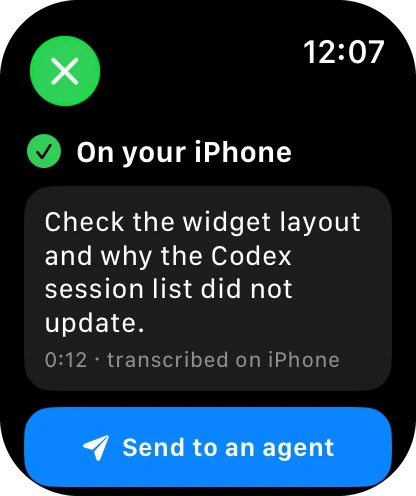
The iPhone turns your voice into text on the device itself, and the watch shows it. Nothing is sent until you have seen it. Say again records it again, the language button hears it again in the other language, and Edit opens the system's text input.
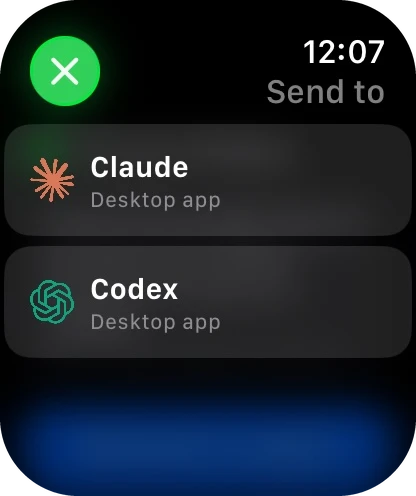
Tap the agent to send it to: one button such as Send to Codex when there is one agent, or one button per agent. A new session starts on your Mac, in a task folder of its own.
When the session reaches the watch, the screen turns into its page: your prompt above, the agent's reply below. Speak reply continues it; New conversation starts another prompt.
When the iPhone is out of reach, the prompt waits on the watch and is delivered when the two are together again.
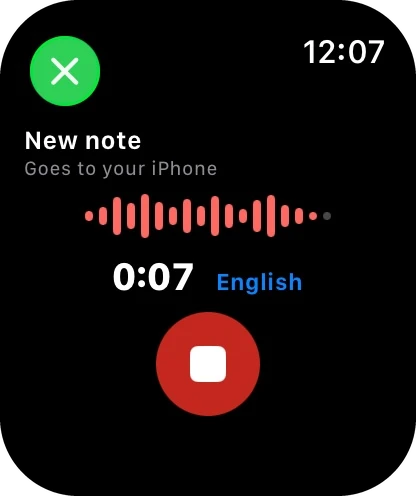
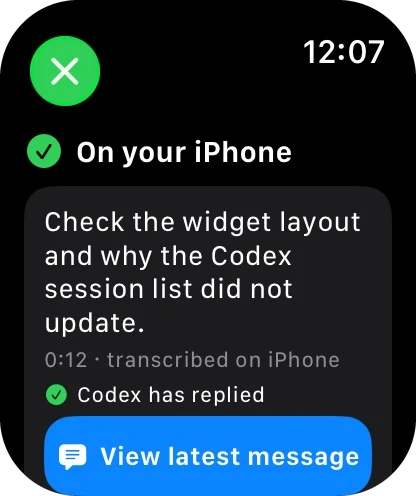
Languages. The watch hears the language it is set to, or the other one of English and Simplified Chinese. Your choice is kept for the next recording.
Recordings on iPhone. Every recording is kept on the iPhone, in Sessions → Recordings (the waveform button). Prompts stay until you delete them; replies to a session go after 7 days. The audio stays on the iPhone; only the text you send goes to your Mac.
Replies
A spoken reply to a session can run up to 3 minutes. It needs the iPhone within reach, because the iPhone turns it into text; after you confirm it, the iPhone sends it at once.
Setting up voice
- The watch asks for the microphone the first time you record.
- Speech recognition runs on the iPhone. In the iPhone app, Settings → Apple Watch → Voice input turns on when Agent HUD is installed on your Apple Watch; if you declined, it links to iPhone Settings.
Alerts and Live Activities
Alerts are the iPhone's banners, mirrored to the watch; turn them on in the iPhone's Settings → Notifications → Banners. Tapping one about a session opens that session's page. On watchOS 11 and iOS 18 or later, running sessions also appear in the Smart Stack. Both need Agent HUD Remote.
Last updated
Agent HUD Remote
Agent HUD Remote connects iPhone and Apple Watch to your Mac on any network through your own iCloud, with conversations, decisions and alerts.
Built-in MCP server
Agent HUD's MCP server lets your agents read its data, answer usage questions and reshape the HUD as drafts that only you can save.